Eat out.Stay on track.Accurately.
Other apps scan and guess. SimplyCal asks — the oil, the sauce, whether you shared. Snap a photo, chat with AI, get a real number — accurately.
Sign in with Google — one tap, no password, no app to install.
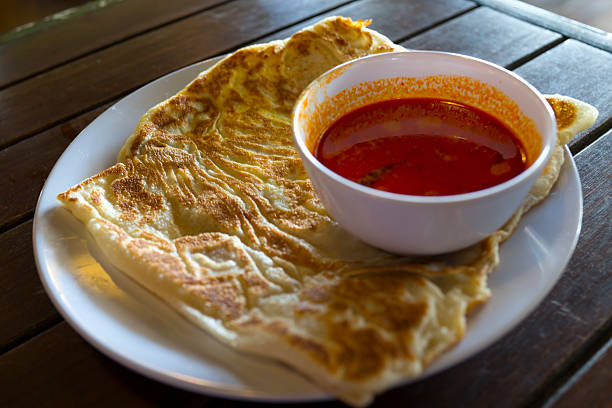
1. How many pieces did you have?
2. Did you finish all the curry sauce?
Ready to log
Roti Prata (2 pcs) with Curry
480 kcal
P 10g · C 58g · F 22g
The problem
"You stop tracking the moment you eat out with friends."
68%
of people stop tracking calories the moment they eat out
3×
more likely to abandon a diet that bans eating with friends
$0
what SimplyCal costs — free to use, no ads, no upsells
Weight loss should be sustainable — and that means it has to work when you eat hawker food, share dishes, or have no idea what went into the bowl. SimplyCal is built for that reality.
How it works
Built for how people actually eat.
No barcode scanner. No massive food database. Just AI that actually understands your meal.
Snap a photo & chat with AI
Take a photo of your meal and describe it in your own words. The AI asks follow-up questions — about the oil level, extra toppings, how much soup you drank — until it has a real estimate. Not a guess, a real one.
Works for any meal, anywhere
Hawker centre, zi char, shared plates, or a bowl where you have no idea what went in — SimplyCal handles it. It knows Singapore food and adjusts for portion size, cooking method, and what you actually ate.
See your whole week at a glance
Navigate Mon–Sun with a tap. Calories, protein, carbs, and fat all in one clean view. Past days show a colour ring so you know at a glance how each day went.
Progress without the pressure
Streak, weight trend, BMI card — everything you need to stay consistent, nothing you don't. Weight loss should be sustainable, and that starts with actually seeing your data.
On your phone
Put SimplyCal on your home screen
No App Store or Play Store — it opens like an app once you add it from your browser. Same account, same features, zero install fees.
SimplyCal
Web app · Free
Add from Safari or Chrome — works like a native app on your home screen.
Not from an app store. Follow the steps below — it takes about ten seconds.
iPhone & iPad
Safari
- 1Open simplycal.online in Safari (not the in-app browser).
- 2Tap the Share button — square with an arrow pointing up.
- 3Scroll down and tap Add to Home Screen, then tap Add.
Android
Chrome
- 1Open simplycal.online in Chrome.
- 2Tap the menu ⋮ (three dots), or use Install app if Chrome offers it.
- 3Tap Add to Home screen or Install app, then confirm.
After you add it, open SimplyCal from the new icon — it should open full screen without the browser bar. On Chrome (Android), you may see "Install app" instead; both do the same thing.
SimplyCal
Log your next meal out right now.
Sign in with your email in seconds. Snap a photo of whatever you just ate, let the AI figure it out, and you're done. No more skipping log days because you ate out.
Free. Works in any browser — add to home screen for an app-like shortcut.